
See when they’re free. Never what they’re doing.
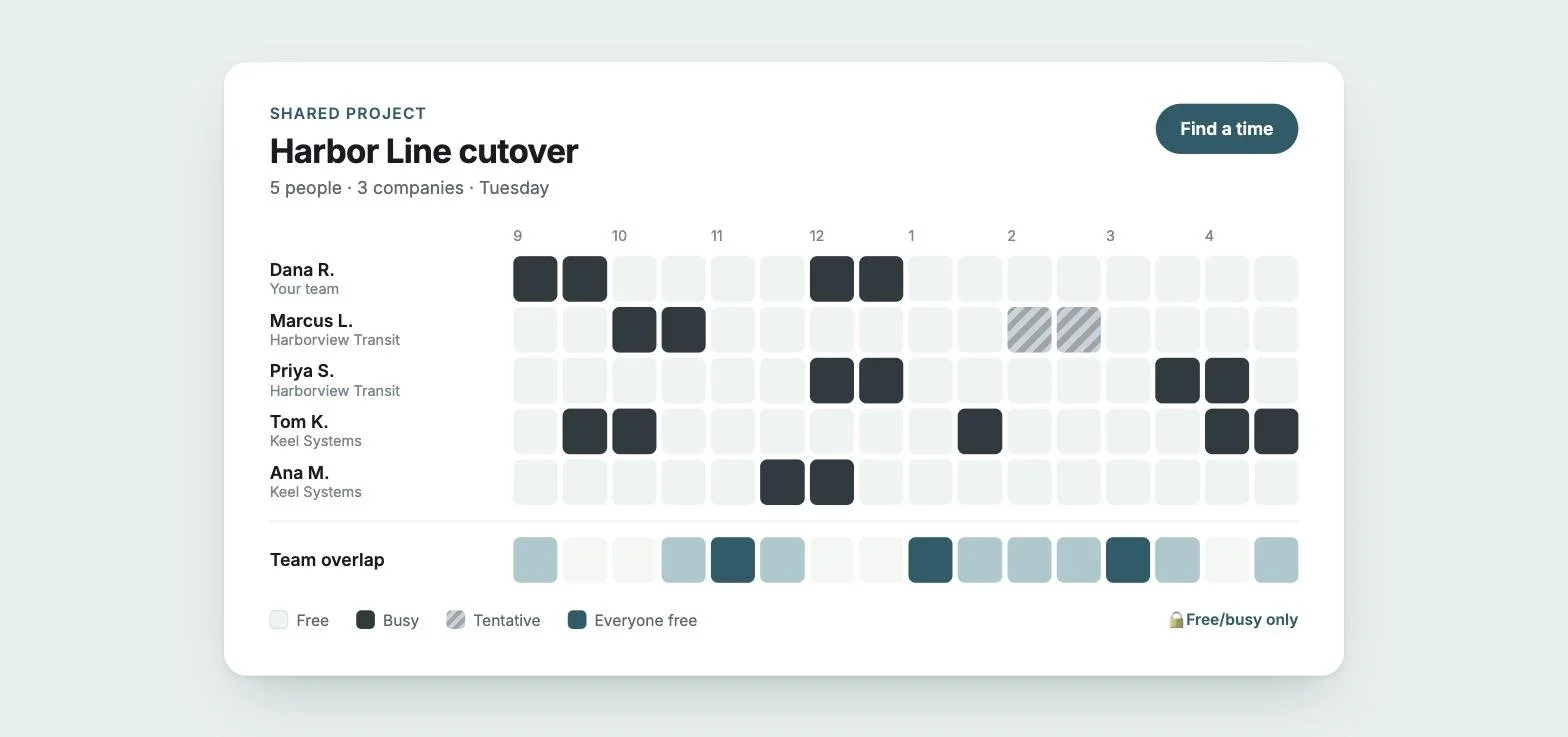
Opalpane gives project teams from different companies one live view of everyone’s availability: free/busy only, within the hours each person chooses, shared with consent and scoped to the project.
Scheduling across companies still happens in reply-all.
Your calendar tools work well inside your company. The moment a project includes a client, a vendor or a partner agency, you’re back to trading times by email.
Endless threads. “Does Tuesday work?” becomes five emails and a day of waiting.
Stale screenshots. Someone pastes their week into an email. By the afternoon it’s out of date.
Oversharing. The alternative, opening your calendar to another company, exposes meeting titles, attendees and notes that were never theirs to see.
One shared view, set up in minutes.
Create a project
Name the engagement and invite the people you need to coordinate with, at any company.
They approve, on their terms
Each person gets one email. They connect the Google or Microsoft calendar for their own email address, with free/busy-only access, and choose the hours they're available for this project. Nothing is shared until they say yes.
See everyone's availability
A live board shows each person's free and busy time, in your own time zone, and highlights when everyone is free.
Schedule the meeting
Opalpane suggests times inside everyone's hours and sends a standard calendar invite from your own calendar, with a Teams or Google Meet link included.
Built for work that spans organizations.
Live availability board
Free and busy time for everyone on the project, day by day in 30-minute blocks, read live from each person's own calendar. It shows the working day, widens to cover everyone's hours, and opens to the full 24 hours in one click.
Your hours, in your time zone
Choose the hours you're available for each day of the week, in your own time zone. Set them once for all your projects, or differently for each one. Outside those hours you show as unavailable, and nobody is offered that time.
Team overlap at a glance
See instantly where everyone is free, where some people are, and where nobody is. Times appear in your own time zone, and you can see each person's local time.
Tentative holds respected
Meetings someone hasn't confirmed are shaded differently and never offered as open time, so you check before booking over them.
Suggested times, real invites
Pick the attendees and a length. Opalpane proposes times that fall inside everyone's hours and sends the invite through Google or Microsoft, with repeats and reminders. If you choose a time outside someone's hours, you get a heads-up before you send.
Meeting links included
Every meeting gets a Teams or Google Meet link from the organizer's calendar, unless you leave it off for an in-person meeting. Only the people invited see the link, the meeting title and its details.
Repeats that keep their time
Daily, weekly, every-other-week and monthly meetings are set in the organizer's time zone, so they stay at the right local time through daylight-saving changes.
Link your accounts
Use Opalpane with more than one email, say your firm and a board you volunteer for? Link the accounts to switch between them without signing out, and see your availability and projects across all of them on one board. Each account keeps its own calendar, plan and projects.
Cover for each other with Pro+
For teams that need it, Pro+ projects let members who opt in see each other's meeting titles and locations and ask a teammate to cover a meeting. Meetings marked private stay hidden, and everyone on the project needs Pro+.
Access that expires on its own
Everyone confirms their sharing every week, project owners included. If they don't, access ends automatically. Anyone can stop sharing from the project page at any time, or disconnect their calendar or delete their account from the Account page.
Archive when the work is done
Owners can archive a finished project. It becomes read-only and stops looking at anyone's calendar, and it can be brought back later.
Help built in
Members can report a problem or send feedback from inside Opalpane and get a reply by email. If a calendar connection expires, Opalpane tells you straight away and lets you reconnect in one click.
Shared with the project. Invisible to everyone else.
What the project sees
- When you're free or busy
- The hours you've chosen for this project
- Your name and time zone
- Whether your sharing is active
What no one ever sees
- Meeting titles and locations*
- Descriptions and attendees
- Call links, notes or attachments
- Your email address, or which other accounts you've linked
- Anything outside the project's view
On Free, Pro, Team and Government & Enterprise, Opalpane requests free/busy access only, and only for the calendar that belongs to your sign-in email. Pro+ adds access to meeting titles and locations for members who opt in. Calendar connection tokens are encrypted at rest. Archived projects stop reading calendars entirely.
How we protect your calendar →
* Free/busy only by default. In specific cases, to meet a particular need, a customer can choose to share meeting titles and locations within a Pro+ project. Sharing is opt-in for each member.
For teams that work across company lines.
Consulting and systems integration
Client stakeholders, subcontractors and your own team, on one schedule.
Government programs
Agency staff and vendors coordinating reviews, cutovers and go-lives.
Construction and engineering
Owners, designers and contractors lining up inspections and site meetings.
Technology projects
Customer, vendor and partner teams planning migrations and launches.
Free for everyone you invite.
You only pay for the people who run projects and schedule meetings. Invited participants never need a paid seat. Pro+ projects are the exception: every member needs Pro+.
Paid plans start at $12.99 per organizer per month after the pilot. Pilot teams use Opalpane free.
Questions, answered.
Can other people see my meetings?
Not by default. Opalpane shows only whether a block of time is free or busy, never attendees or notes. In specific cases, a customer can choose to share meeting titles and locations within a Pro+ project; meetings marked private stay hidden. Meetings you schedule in Opalpane show their details only to the people invited, and teammates never see each other's email addresses.
Can I limit when people can book me?
Yes. Choose the hours you're available for each day of the week. You can set default hours for all your projects and different hours for any single project, so a client project might only see your mornings. Outside your hours you show as unavailable and no one is offered that time.
Does it handle time zones?
Yes. You set your hours in your own time zone, everyone sees the board in theirs, and repeating meetings keep their local time through daylight-saving changes.
Do the people I invite need to pay or create an account?
No payment, ever. They get a single email, review the request, connect their calendar with free/busy-only access and choose their hours. That's the whole setup.
Which calendars work?
Google Calendar (including Google Workspace) and Microsoft 365 / Outlook. Each Opalpane account connects one calendar: the one for the email address you sign in with.
I use more than one email address. Can I see everything in one place?
Yes. Link your accounts and switch between them without signing out. The All my accounts board shows your availability and projects across every linked account. Each account keeps its own calendar and plan, and nobody in your projects can see that your accounts are linked.
How long does access last?
Sharing is confirmed weekly by everyone, project owners included. If someone doesn't confirm, their access ends automatically. Anyone can stop sharing at any time, and you can delete your account from the Account page whenever you want.
What happens with a tentative meeting?
It's treated as busy and shaded differently, so nobody books over it without checking with you first.
What happens when a project ends?
An owner archives it. The project becomes read-only, stops reading anyone's calendar, and can be unarchived if the work starts again.
How do I sign in?
With a secure link sent to your work email. You confirm which account you're signing in to before anything happens. There are no passwords to remember.
Is Opalpane available now?
We're running a pilot with a small number of teams. Join the pilot to get access.
Stop trading calendar screenshots.
Join the pilot and give your next cross-company project one view of everyone's time.